


TRAction’s reporting services include data validation and enrichment, ensuring any errors identified are resolved and data meets the format requirements prior to ARM submission. This article applies to both EU and UK MiFIR.
We have identified the 4 most common errors in the transaction data we receive from our clients.
1. Missing customer details
This is the most common type of MiFIR error. The exact error messages for this type of error can differ depending on the fields concerned.
There are many fields required to be populated for client details. Below are some errors that are most prevalent in relation to missing customer details.
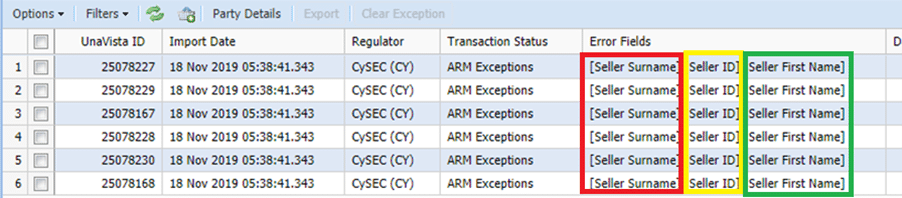
What went wrong?
We get these exceptions because some, or all, of the customer details for these transactions are either missing in our client’s database or are not in their client file (if they send one). Special symbols or spaces can also trigger an error, as these cannot be recognised by the LSEG platform (the Approved Reporting Mechanism (“ARM”)).
- Missing client first name

- Missing Buyer ID and Buyer date of birth

How is this fixed?
Whenever there are missing customer details, we contact our client and ask them to update their database or the files they send on a daily basis. Once the client has provided all the missing details that we need, we then amend the exceptions and resubmit them to the ARM.
We further check the files shared by the client to make sure the specific trades that have failed do not have any special characters or spaces. If they do, then we remove them and resubmit them to the ARM with the corrected data.
2. Duplicate transactions
When there is a duplicate transaction in the client data, we get an error message of [Report Status]. See below highlighted in yellow.

What went wrong?
There are 3 possible reasons behind this ARM exception. See below examples:
(a) Duplication of a transaction –
The client has duplicated a row of data (i.e. a duplicate of a transaction) in the file they sent to us.

(b) Reusing a deal number for different transactions –
The client has reused a deal number that has already been used for another transaction in the file.

(c) Using the same trade number for a position with several transactions –
The client has a trade that includes several transactions and the same transaction reference number is used with a different quantity and price for the same financial product.
How is this fixed?
For all three scenarios, TRAction will reach out to the client to confirm the data.
In the case where there is a duplicate transaction, we confirm with our clients whether this was added to the file twice by mistake.
If it was an unintentional duplicate, we can clear the exception with the ARM without resubmitting the file. If the client confirms it was not a mistake, we follow up to confirm the correct treatment before proceeding.
In the case where a client has mistakenly reused an existing deal ID, we will ask them to provide the correct deal ID for the transaction. Once it is provided, we resubmit the exception with the correct information.
In cases where a client is using the same transaction reference number, we inform the client that even if the transactions are for the same trade (i.e. for various legs of the trade), each must be submitted individually with its own unique transaction reference number. Once we have been given the new unique transaction reference numbers, we can resubmit the exception with the correct information.
3. Incorrectly formatted dates
We often see clients populate the Trade Date Time fields in the wrong format. This ARM exception generates an error message of [Trading Date Time]. See below how it appears:

What went wrong?
This happens when a client incorrectly formats an open or close time for a trade in their file. Date formats must be in ‘YYYY-MM-DD’ format. If the client enters the trading date as ‘2020-24-06’ for a transaction, it will get rejected as it is trying to report it as the 6th day of the 24th month, which of course is not possible.

However, under certain circumstances, an incorrectly formatted trading date is mistakenly accepted by the ARM because the system is unable to identify the error. For example, if a trade date of 3 January 2020 is written as ‘2020-03-01’, and that date falls prior to the submission date, this information would be accepted by the system as 1 March 2020.
How is this fixed?
TRAction can either fix the errors for our clients or get them to amend the errors and resubmit the file. We can then reprocess all the files again once the format is corrected.
4. Invalid Country Code Prefix in Individual Identifiers
When the Buyer/Seller ID, Investment Decision ID, or Firm Execution ID represents an individual, the identifier (e.g., National ID, Passport Number, or CONCAT) must begin with a valid ISO country code (e.g., GB, CY, DE, or FR) followed by the individual’s identifier. Where the identifier does not meet this format requirement, the ARM exception gives the following error message:

What went wrong?
This occurs when an individual identifier provided by the client in the Buyer/Seller ID, Investment Decision ID, or Firm Execution ID contains an invalid ISO country code or does not include the required country code prefix.
How is this fixed?
TRAction requests that the client provides the correct ISO country code or updates the files accordingly. Once the correction has been made, the files can be reprocessed successfully.
What do you need to do?
In order to minimise the burden on your operations and compliance teams, and also reduce time spent on back and forth communication to fix errors, it is important to get the raw client data right in the first instance before you submit it to your delegated reporting service provider such as TRAction.
Take the time to review your system settings and confirm your reports are being generated correctly. This alone will meaningfully reduce your reporting burden. We also recommend our clients check whether we can automatically extract the details from their platform to minimise the errors that occur when using the ‘file submission’ method.
If you have any questions, please feel free to contact us.
